Jaeger
May 13, 2015
I agree that putting all points in one stat can be disastrous, however I'm afraid accuracy is bound to be a dump stat at only 1% per point, unless certain weapons or skills have a critical multiplier.
Back to Attack vs Defense, I hope your system works out to avoid convoluted formulas and keeping small numbers. However, if it doesn't work you can consider...
1) omitting Defense altogether and just stick with HP
2) scale Attack higher than than Defense in damage formula.... ex: Damage = (Attack x 1.5) - (Defense-1.25)
3) make Defense based on percentage
jack1974
May 13, 2015
The system is super simple, so that can be summarized in 3 rules:
1) each hit reduces defense by 1, no matter what
2) damage = attack - defense
3) if defense > attack, damage = 1
then of course if "works", this has to be seen

I want to keep the defense reduction mechanics, since will help to shorten battles too, but might use method 2 or 3 you listed above since in cases where defense is much higher than attack it might be a bit of a problem.
yayswords
May 13, 2015
(for example there's no staggering in this game)
Really not fond of stagger since SotW. At the very least, not fond of attacks that require stagger.
jack1974
May 13, 2015
No attack will have any requirement

As for stagger it would really be bad in fights 5 computer AI vs party of 3 !
yayswords
May 14, 2015
Oh, I thought you wanted to add it.
jack1974
May 14, 2015
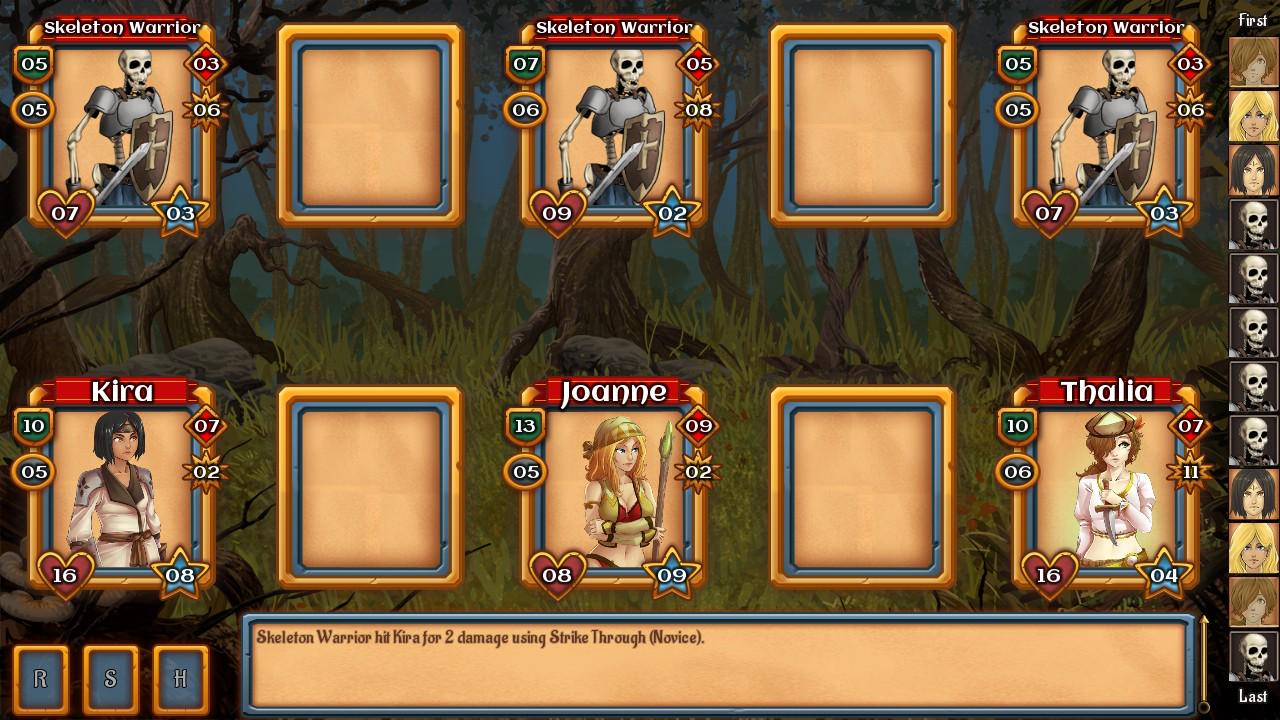

https://pbs.twimg.com/media/CE9lt42WEAACTdN.jpg:large" style="max-width:100%">
a very productive morning, fixed/added a lot of things, and also tried to make smaller icons to fit even the Speed and Critical Hit stats. In practice on each portrait there is:
on the left, top to bottom = defense, speed
on the right, top to bottom = attack, critical hit
and at the bottom HP/SP like before. I am thinking to display the level maybe in the center between HP/SP, which could be useful for enemies in particular.
I'm also thinking that when you click on a portrait, I'll display all the info (like aggro) on bottom, over the log (it would disappear after you choose an action). I'm still not 100% sure but I think I'll also give up completely the resistances thing. Just make some enemies resistant to specific damage, for example skeleton should be immune to bleeding
and things like that.
I still have to implement the combo skills (I'm not even sure I'll manage it!) and the battle setup bonuses, but could upload an alpha tomorrow maybe.
yayswords
May 14, 2015
I read that as

http://www.troll.me/images2/cory/tomorrow-i-promise.jpg" style="max-width:100%">
Also, no resistances sounds great. For Loren/SotW it would be good, but here with just one mage it's great.
jack1974
May 14, 2015
I said "tomorrow MAYBE"

I want first to add those missing things, since could change the battles a lot: not the starting bonuses that shouldn't be big in any case, but the combos yes since are the most powerful skills

Troyen
May 14, 2015
I don't know if I would add the level to the display, it's already getting fairly cluttered. Without your explanation, I wouldn't have known what three of those icons were.
Do you have a small boot or something to use as Speed? I think the crit star works nicer as damage and then maybe a red circle for crit?
jack1974
May 14, 2015
Yes initially I thought to use the critical icon as damage as well. Anyway I'll add tooltip/help in game. A sort of boot icon/shape for the speed would be more intuitive though, will try to add that
yayswords
May 14, 2015
I don't think I've seen levels used in any combat calculations in Loren/SotW, so as far as I can tell, they are purely a power indicator. But you have every (since resistances aren't in) measurement of strength on the combat screen right now anyway, so I think it would be a needless addition.
Jaeger
May 15, 2015
I agree a boot (or foot) can a suitable symbol for speed. A sword or fist could be used for attack. For critical, maybe a skull or target?
weaselton
May 29, 2015
I like what I see for the layout. I only have one minor thing of criticism and it applies to SOTW and Loren specifically. On the battle log for some reason it defaults to the top of the screen rather than the most recent action. That makes it very hard to see what effects it had via the text. That being said since I finished both games its not something that really hampers the overall playability.
jack1974
May 29, 2015
Yes is a bit hard to make it work as intended (even if seems a simple thing). On this game I've partially solved it by adding most actions on a single line, for example before it was split in several lines, now you see stuff like:
"Skeleton Warrior inflicted Burning (Novice) on Kira. Attack decreased by 20%. The condition will expire in 3 turn(s)."
before each sentence was in a single line, in reverse order, making it a bit hard to understand indeed!
