Desktop Forums Blog Support Patreon
Official Steam Group | Patreon Chat
yayswords
Don't stop nitpicking. It's a beta. We're helping Jack improve the game so people will buy it. Every nitpicked sentence is a meal for his cat :P
Troyen
I just feel bad that I've posted like 100 things and I've barely made it into the game. :( (Though, I'm noticing far fewer mistakes in the story itself.)


I'm on Day 21, Hibernia now, the very first opening quest to drop pelts off at the tanner.


Some things I noticed about combat:
[list]
  • [*]There are a number of places where it talks about the Warrior and Thief classes (and probably Mage, but I don't have one). I thought it was Ranger, Hunter, Druid in this game? The sidebar on the combat screen is one (right above the stagger bar) and the combat tutorial has several more. Item shops do as well. "Bombs only usable by the Thief class."

  • [*]The combat tutorial jumps all over the screen. Each time I hit next, the horizontal position of the window changes by like 400 pixels.

  • [*]Combat Tutorial, Melee and Ranged Attacks: "However, if you are in the front row you incur a penalty..." (delete "in" before "a penalty").

  • [*]Combat Tutorial, Melee and Ranged Attacks: The last paragraph says "If you attack a Thief with a Warrior, the damage will be reduced proportionally to the distance (in term of rows) between the attacker and defender." This is really confusing. Does it mean that someone in the bottom left corner does less damage to the top-right corner enemy than if I was shooting from the top left to the top right? Or does it just mean first row to second row? Are you counting rows horizontally or vertically? (All other skills refer to "first row" as the "front line of combat".)

  • [*]I second the comment about the post-battle "click to continue" button being kinda small and located really far away. Make this button more obvious please!

  • [*]Aside: I'm sometimes confused about turn order (maybe because I keep comparing it to Loren). I understand the portraits represent who is going in what order, but it's a little confusing when the active character is flashing at the top of the list when I'm not doing anything but they suddenly drop further into the list when I select an action. I know this is indicating when that character will be active again, but my character is vanishing from the top of the list before I've even confirmed my turn (and if I'm checking out different options, I could be flickering places quite a bit). Perhaps this would be less disorienting if the active character remained at the top of the list until after the action goes off. Or, perhaps I'll get used to it.

  • [*]Why do environmental effects count down from 99? Game engine limitation? What'll happen if I hit 0? (I need some healing spells to test this first!)

  • [*]Actually, the 99 counter is fairly distracting, especially in Ninum when it's blue. It's so much bigger than the actual health/mana banners I keep thinking its character HP. (Maybe the banners need to be bigger or slightly brighter? Dark blue for skill points on the night battles is a little subtle.)
  • [/list]


    Ninim, Day 21:
    [list]
  • [*]The overmap doesn't really lag for me, but the arrows spend a lot of time faded out compared to faded in.

  • [*]Nitpick: The "group of wild animals" is usually just one. ;) (But one that's powerful enough to destroy me no matter what I try. Guess I have to take playing on "Hard" seriously this time.)

  • [*]Some places I'm not allowed to go give me a dialog that says "we can't go there yet!" But if I travel "East of Ninum" I just get a black screen and then the city map reloads. Actually, just the tavern says "we can't go there yet!" The mysterious path, my house, and Vaelis' house all give me actual scenes with the characters (saying "we can't go there yet!") Is the tavern dialog a placeholder?

  • [*]The "sell individual item" button is in an awkward place and a little hard to notice.

  • [*]If I click an item to verify I don't want it anymore, I can't seem to get the "sell all items in this category" button back.

  • [*]It's nice that selling all items is a really speedy way to clear out junk, but if I'm not paying close attention I don't see how much gold I earn, unlike selling one-by-one. Maybe it doesn't matter. I definitely would prefer no extra confirmation popup just to show the gold though.

  • [*]Again, toggling tabs on the inventory screen causes the music to skip a bit. Especially if I'm clicking quickly.

  • [*]I can't seem to scroll backwards through text history while in the General Shop selling pelts. I could when the Announcer was talking in the arena and when meeting the lucky illusionist. This is surprisingly more frustrating than I would have expected. Also, why does the text window disappear and reappear after almost every line?

  • [*]Same with the conversation outside with Vaelis. Scrolling back doesn't work. However, once I get home I can scroll again.

  • [*]In the story, the twins go to sell pelts and come home with cash. Later that night, their father gets sick and they have to go fetch a healer. On the overworld map, selling pelts happens on Day 21 of Hibernia, but the healer quest has me on Day 28. Shouldn't it still be Day 21? (Especially if "days until next plot point" is still 1)

  • [*]Four battles into the game and I miss having an indicator on the post-battle screen that says how close to the next level my characters are. Looks like there's plenty of room for this, but I only have two party members right now.
  • [/list]


    Ninim, Day...28?
    [list]
  • [*]I've hit level 2 and I still haven't found an explanation for what the "Tired", "Shattered", "Frozen", etc., conditions do.

  • [*]When Vaelis joins the party, it shows him as having +150 exp. Althea and Shea still show the +100 from the previous quest.

  • [*]I don't like this "forced to pick skills/attributes before continuing" thing. I have no idea what kind of character Vaelis is since I haven't seen him in battle nor examined his inventory, but I need to assign attributes now. Apparently he's a "Mercenary", but at this point I don't know what that means.

  • [*]Tavern: The first quest currently reads "Animal Problem by a local farmer". This implies he's creating an animal problem. Should probably be rephrased to indicate he's having problems with wild animals (and Problem shouldn't be capitalized). Also might want some commas: "Aster[color=#BF0000],[/color] the farmer east of Ninim[color=#BF0000],[/color]" to make it easier to read (the second quest does this right).

  • [*]Tavern: The second quest on the job board should probably say "100 XP" for consistency.

  • [*]Tavern: "Kill [color=#BF0000]g[/color]iant snow spider" (lowercase)

  • [*]Tavern: Not 100% sure about this, but "Hunters' Guild" might need an apostrophe. (Giant spider quest)

  • [*]Tavern: I get the "we can find jobs here" speech every time I enter, even if I'm already on all the quests.

  • [*]Forge: I encountered an issue when I was trying to buy two Fine Leather Boots of Speed. I have 298 gold and it would cost me 268, but after clicking the "buy two boots for xxx" button - nothing happened. Actually, that button press didn't even register, I was still stuck on the "select quantity screen" and couldn't even cancel. The game didn't freeze because music was still playing. I was eventually able to escape to the menu and escape again to return and the buttons worked properly. I did not encounter this when buying a single sword upgrade or selling multiple pelts.

  • [*]Forge: When I compare items in my inventory to what a character has equipped (it's so nice to do that in the shop now!), It's a little hard to notice the "close" button in order to switch back to "sell" mode since it's off on the side.

  • [*]On the overmap, why is Vaelis's portrait faded out? See https://dl.dropboxusercontent.com/u/4071729/SotW/Faded.png.

  • [*]Bandit quest: I followed the trail and accepted the bandits' offer. Vaelis says: "I will not part in this." - Should be "take part"?

  • [*]Quest Failed! Bandits stealing pelts: Reward 100 XP. Wait...I didn't actually get the XP? The screen said I did! (Also, the gold coin award might make more sense before the conversation about how much money they earned.)

  • [*]Wolf ambush at a trap: Shea says "Looks like someone is about to catch us!" They're wolves though, not people.

  • [*]Farmer quest: Another spot where I can't scroll back through the text. Most of the rest of the chapter was OK.

  • [*]That wolf pounce is hitting for like 39-53 damage at level 2 when the wolves are listed as "Weaker". Ouch? Sometimes it's a first round KO to my team before I even get to go. That's with a wolf attack of 25 to Althea's defense of 44. (Figured out the way to counter this is to just max constitution at first.)
  • [/list]


    Skills: (redux)
    [list]
  • [*]Actually, this one is a trait: Dual Wield: "Offhand weapons inflict 75% damage" (inflict should be singular, drop the s).

  • [*]Conditions are inconsistently capitalized. Some places they are capitalized like Stun talks about Confusion. Some places they aren't like Rally, Leap Attack, and Disarm.

  • [*]Dirty Tricks: "After 5 turns, or once [color=#BF0000]the[/color] character runs out of SP..."

  • [*]Final Blow: Same remark on "If not boss" as with Cross Cut and Critical Hit. Whatever you ultimately go with should be consistent across all skills.

  • [*]Final Blow: Wording is off at the beginning: "Hits target with critical hit and will do instant kill if target is under 30% health" should maybe be "Critically hits target and instantly kills them if they are under 30% health"

  • [*]Disarm: If you aren't going to capitalize "Paralyzed condition", you need to add "the": "causes [color=#BF0000]the[/color] paralyzed condition".

  • [*]Disarm: Here you use "(if enemy not boss)". I think every time you've mentioned the "not boss" caveat you've used a slightly different representation. ;)

  • [*]I haven't used it in battle, but is there a reason the Recover stance requires 15 SP? Seems like you slow yourself down and give up three turns before you start getting any benefit (and then you only get back a net +20 SP). Maybe it is balanced though; I'll try to check later, but this just sounds like something less appealing than the Hunter praying to tree gods for 50% SP and I'd probably skip on my first play-through. Or second.

  • [*]Throwing Axes: "Throws two axes (double attack) [color=#BF0000]at a[/color] single target in [color=#BF0000]the[/color] front row for 125% damage, causing [color=#BF0000]them to bleed [/color]for at least 3 turns." "To" a target implies you're giving them the axes to use. :) If Bleeding is a condition, ignore the last change, but I'd recommend just capitalizing all conditions. (They even show up yellow on some pages, I think, which is even better.)

  • [*]I think Shea's wagon trait is bugged. At level 2 he now starts off at 50/55 for HP and SP even when everyone else has fully rested.
  • [/list]


    A general remark that the gold exp bar outline sometimes blends in a bit with the character in the background (especially Althea in Ranger mode).


    I'm stuck on day 28 playing hard. I can maybe take out one snow wolf encounter before I have to rest (because Althea gets herself KOed even though she's not doing that much in battle), but I can't even do the "easy" quests. I might need to restart and play the stat maximizing game better to continue. Definitely a huge jump up from Loren's and PS's hard difficulty (both of which I beat on my first try, with only a couple of boss battles giving trouble). A lot of it is due to the defense/attack disparity at this level and how enemies often go first even when I have a higher speed (slightly).


    Anyone else trying hard yet? Would be nice to hear another perspective.


    Here's my system setup:

    2011 MacBook Pro w/2.3 GHz i7 and 8 GB RAM running Mac OS 10.9.2.

    Video card: AMD Radeon HD 6750M, 1024 MB
    yayswords
    I've hit level 2 and I still haven't found an explanation for what the "Tired", "Shattered", "Frozen", etc., conditions do.

    Mouse over the debuffs when you cause or suffer them :) there actually isn't so many debuff types in this game.


    Anyway... gonna nitpick something. When you convince the bandits to hand over the recipe, don't have them say "thank god". Don't mix in real religions. "Thank the Gods" if anything (capitalized for reverence).
    Troyen
    I've hit level 2 and I still haven't found an explanation for what the "Tired", "Shattered", "Frozen", etc., conditions do.

    Mouse over the debuffs when you cause or suffer them :) there actually isn't so many debuff types in this game.


    Right, they are in combat (and I guess I forgot that when I posted). However, I'm not learning skills or special item stuff in combat, so the mouseovers aren't there when I need them.


    A side note about difficulty: running nightmare with a frost druid and a melee ranger (with the heal skill) has so far been much easier than my ranger/hunter combo on hard. I'm able to clear pretty much all the optional yellow/red arrows before proceeding with main story events. I don't know yet if that's because the hunter is weak or the druid is strong (especially in the ice zone) or the hard difficulty is bugged or because I picked the wrong skills on my first attempt. Or maybe two-handed weapons are just awful? Needs more testing.


    I feel like this frost druid/melee ranger combo on nightmare is about where "Hard" was on Loren and such. You still have to pay attention and choose skills carefully and there's a high chance of death if you're too aggressive or not aggressive enough, but it's not the "oh, I'm fully rested and I can't even beat the next required fight" I was having before. This way is a lot more fun. I'm not sure if this is your intended "Nightmare" difficulty though, because I can take on a whole bunch of optional wolf fights and do fine.
    yayswords
    After the goblin fortress event, the twins are fully recovered for the next chapter. But when Vaelis rejoins you to hunt for a bear, he has whatever HP/SP he finished the last goblin fight with.
    Troyen
    If somebody dies and gets resurrected (I was fighting Ratmen if that makes a difference), they lose the environmental debuff.


    Here's another weird one:


    I'm fighting the bandits stealing pelts. This is the grid:


    [code][ ] [ ] [ ] [ ]
    [A] [S] [ ] [ ]
    [ ] [V] [B] [ ][/code]

    Shea is a warrior with a sword. When he goes to melee attack the Bandit from his position, it offers a range of 5-6 damage. If he swaps spots to the bottom-left corner and goes to melee attack the same bandit, it offers a range of 8-9 damage. I thought there was a penalty from meleeing from the back row? (It's not a changing status thing on the bandit because I can swap and attack before anyone else moves.)
    yayswords
    Thieves take less damage (from warriors) if you hit them from the sides. Apparently that penalty is greater than that of attacking them from the back row.
    Troyen
    Talking to the ratmen gives me two options: item shop or training fight. If I do the shop first, I can't later try the training fight (but I can try the shop again).


    The checkmarks in the shop screen that indicate if a character can equip an item only update for store items. If I'm in the healer shop and select a staff for my druid, then go to unequip some chain boots from my ranger, the healer is still showing a green checkmark. Actually, none of the items in my inventory show the checkmark stuff - I have to keep going into the slot to check the "available items" section.


    The auto-save seems to save and clear slots at weird times. I guess it's every time there's some dialog choice (even if it's "continue")? It's been fairly handy so far, just strange to see it emptying out slots instead of just overwriting them.
    jack1974
    Haha wow lots of stuff happening overnight! It will take some time to read it all, better get started :mrgreen:

    Glad the map is faster now, I could notice it even on my PC which was already running fine before.
    jack1974
    I'll answer this first, then get to the older posts:
    Talking to the ratmen gives me two options: item shop or training fight. If I do the shop first, I can't later try the training fight (but I can try the shop again).

    Fixed this :)

    The checkmarks in the shop screen that indicate if a character can equip an item only update for store items. If I'm in the healer shop and select a staff for my druid, then go to unequip some chain boots from my ranger, the healer is still showing a green checkmark. Actually, none of the items in my inventory show the checkmark stuff - I have to keep going into the slot to check the "available items" section.

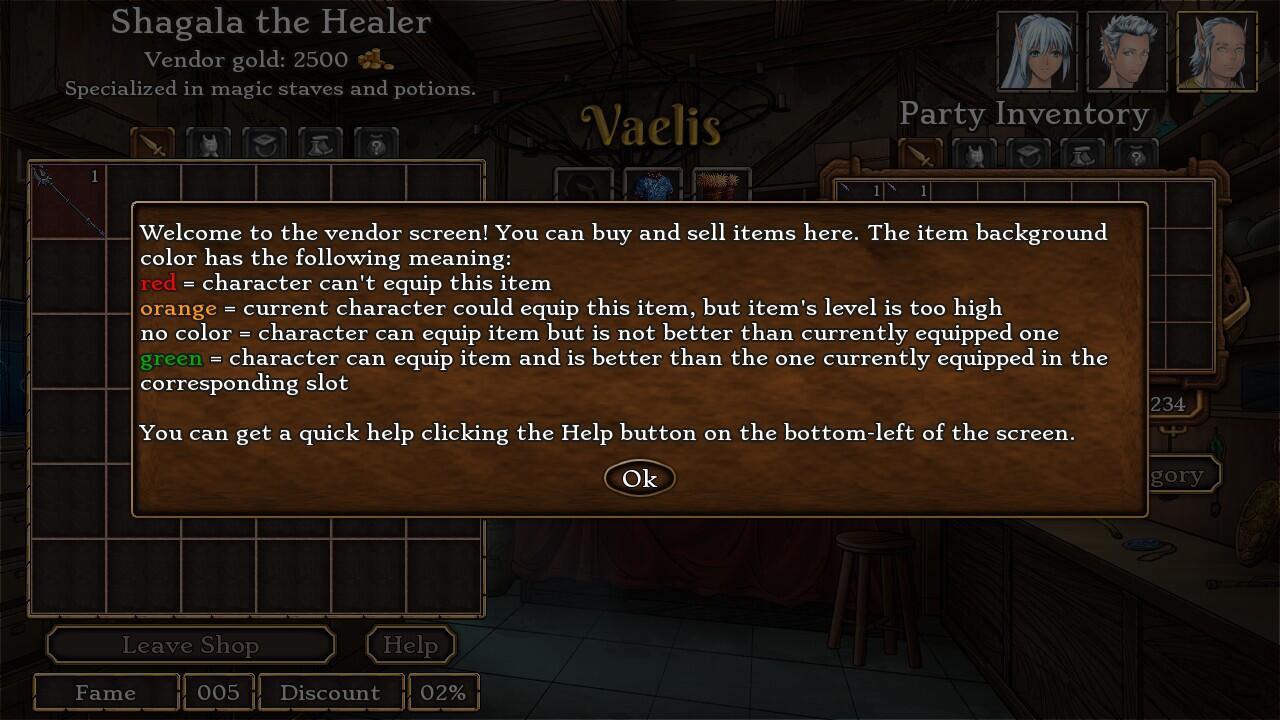
    The checkmarks aren't supposed to show on items indeed. If you can equip an item, has a green background. If you can't because your class can't, is red. If you can't because of level, is orange. Of course I forgot to put a help text for this :oops:

    The auto-save seems to save and clear slots at weird times. I guess it's every time there's some dialog choice (even if it's "continue")? It's been fairly handy so far, just strange to see it emptying out slots instead of just overwriting them.

    Well that depends on Ren'Py so can't change it :)
    Troyen
    I'll answer this first, then get to the older posts:

    The checkmarks in the shop screen that indicate if a character can equip an item only update for store items. If I'm in the healer shop and select a staff for my druid, then go to unequip some chain boots from my ranger, the healer is still showing a green checkmark. Actually, none of the items in my inventory show the checkmark stuff - I have to keep going into the slot to check the "available items" section.

    The checkmarks aren't supposed to show on items indeed. If you can equip an item, has a green background. If you can't because your class can't, is red. If you can't because of level, is orange. Of course I forgot to put a help text for this :oops:

    To clarify: the checkmarks are on the people. But they only show up for people when I click on items. Items have that strange background - sometimes green, sometimes red, sometimes none at all.


    Also, it's a little cumbersome to compare weapons at the store with my off-hand. I can swap it to my main-hand first, but it's an extra step not used on any other slot.


    The auto-save seems to save and clear slots at weird times. I guess it's every time there's some dialog choice (even if it's "continue")? It's been fairly handy so far, just strange to see it emptying out slots instead of just overwriting them.

    Well that depends on Ren'Py so can't change it :)

    Hmm, I don't recall the other Ren'Py games (including yours) doing this (usually they'd have all six slots and overwrite in order 1->2->3->4->5->6->1 whereas I'm seeing up to five blank slots and one auto-save sometimes), but it's not that big of a deal.


    Almost forgot to mention. If I talk to the bandits with the super-powerful recipe and offer to buy it for 50 gold, it doesn't actually charge me 50 gold. I had 41 gold in my inventory at the time.
    jack1974

    [*]This game is eating my laptop's battery, even when it's in the background. I think Loren wasn't quite as power-hungry, but it's been a while since I tested 100%->0%. Might be a RenPy issue.

    Yes, this game is much more power hungry, has much bigger screen size and also uses particles+alpha blending, so definitely another thing vs Loren, but should also look better :)

    [*]Clicking "Back" from the class selection page goes to the difficulty selection page instead of to the Althea/Shea selection page (and if you say that's because the Althea/Shea page has no back button, well, the difficulty selection page doesn't either! Not that it needs one.).

    Fixed :)

    Lag is because of the screen size/more demanding game (and ren'py slowness on this case too :oops:)

    [*]Aside: It's kind of hard to gauge the value of some of these stats on the opening screen. I do like how I can see my HP/SP change with allocation, but I lack a frame of reference for the other stats. For example, I'm sure speed will be super-important like in PS/Loren, but I don't know what 107 means (is that good? average?) nor how adding two points will make that better. I also can't see the secondary stats like critical hit chance, or resistance, etc probably because they would over-clutter the screen. I guess I can calculate them based off my current attribute values, but when I get gear there might be additional modifiers. I guess I'll see when I get to the game.

    Yes considering you get a lot of attributes every time you level up, the initial choice doesn't have a big impact. Not like AD&D games for sure :)

    [*]Typo: The title says "Choose Althea Attributes" when I'm picking for Shea, after picking Althea's. I presume the opposite would be true as well ("Choose Shea Attributes" for Althea when selecting Shea.) The trait selection pages do this correctly.[/list]

    Fixed

    [*]I thought I saw someone else mention this, but Morran is mentioned as Althea's father and all the pronouns refer to Morran as "she". "'One day,' [color=#BF0000]he[/color] said" and "...[color=#BF0000]his[/color] words would become true."

    [*]Fighting goblin hunters trait: "Althea was able to overcome [color=#BF0000]her[/color] fear..." Also, either "from the beating they had got[color=#BF0000]ten[/color]" or "from the beating they received".

    [*]Fighting goblin hunters trait: "That day, she [color=#BF0000]was[/color] discovered to have" or "That day, she discovered [color=#BF0000]she had[/color]".

    [*]Fighting goblin hunters trait: I think "mental conditions" sounds a little better, though "mind conditions" isn't wrong.

    Fixed all :)

    [*]As a general comment, the use of "the" is inconsistent between skill descriptions. Sometimes it's missing, sometimes it's there, so I'm not sure if you were trying to go for brevity. I'll assume not in these remarks.

    I'll probably need to send the skill description texts to be checked all, but I'm waiting for now during beta since I might change them a bit :)

    [*]When I pick my skill, shouldn't it automatically go to the next page for me?

    This was done with a bit of hack, so while possible to do this, for now I'll put it as "secondary fixes" :oops:

    [*]There's a small skip in the music when I click a skill.

    Ren'Py feature :lol:

    Thanks for all the other typos/text suggestion, I've checked them all. Phew, now on the next post in the queue...!
    Troyen


    [*]Aside: It's kind of hard to gauge the value of some of these stats on the opening screen. I do like how I can see my HP/SP change with allocation, but I lack a frame of reference for the other stats. For example, I'm sure speed will be super-important like in PS/Loren, but I don't know what 107 means (is that good? average?) nor how adding two points will make that better. I also can't see the secondary stats like critical hit chance, or resistance, etc probably because they would over-clutter the screen. I guess I can calculate them based off my current attribute values, but when I get gear there might be additional modifiers. I guess I'll see when I get to the game.

    Yes considering you get a lot of attributes every time you level up, the initial choice doesn't have a big impact. Not like AD&D games for sure :)

    Actually, I'm finding out that dumping them all into Con for your front row character makes the difference on the higher difficulties (or +SP for your druid since there's no early-game regen). The rest don't seem to have had as big of an effect as +25 HP, at least not in the first chapter.


    Some of the skills are kind of "new player traps" too - like picking the ones that require dual wielding or a shield before you have the required items or the gold to buy them. It's way better to have at least one healing skill at the beginning.
    jack1974
    -The map is WAY more responsive now--no lag issues at all anymore, even with transitions left on. Still seeing slight blurring with the sprites (as expected, since it didn't sound like you've changed that code at all). I've played a lot of Ren'Py games on this laptop in the past without seeing anything similar, so it seems odd that I'd need to turn transitions off for this game. It's also way more pronounced in the scene with Riley than it is later in the game.

    Yes but you never played any Ren'Py game with so much stuff going on, I'm sure of it :)

    Regarding the blur: is because I have my sprite done at HIGH resolution, and then I scale down when are displayed, the technical explanation was this:
    I don't think Ren'Py renders to a fixed-size buffer (yet), instead it scales each sprite as it's drawn to the screen. Under those circumstances, if your window size is larger than your game's resolution and your sprites normally downscaled, your sprites actually take advantage of the larger resolution used by the window and will appear sharper than other images.


    Some special effects require an intermediate rendering step to a separate off-screen buffer (I think dissolve is implemented in this way). If the buffer size is based on the game resolution rather than the current window resolution, the extra detail from using oversized sprites in an upscaled window disappear.

    Now you might wonder WHY I used higher res sprites? because if you play in fullscreen, the game scales up the resolution to the screen max, in my case 1920x1200, and the sprite show all the details. If you have a screen resolution powerful enough (a desktop computer mainly) the quality difference is very noticeable.

    Check this for example:

    http://imgur.com/xrxJAqL (screenshot taken at 1280x720 default res)

    http://imgur.com/0SoosaY (second higher res, the sprites aren't just zoomed but have more details)

    Hopefully Ren'Py will get the rendering improvement that coder talks about (I admit is a bit hard to understand also for me :lol:)

    -The item tabs on the merchant's inventory are a big improvement--but I still think the Sell button is too far away from your inventory. You can't double-click to sell things (which makes sense, since it's also an inventory screen), so there's a lot of extra mouse movement involved in selling multiple items.

    To sell multiple items, you know about the "sell all items" right? I am thinking where else I could place the button, but I don't see an easy solution...

    -The addition of checkmarks for party members who can use an item makes it much more obvious. However, I noticed that the green/red highlighting on the merchant's inventory indicating whether the selected party member can use each item seemed bugged. Often some pieces of equipment wouldn't have a highlight, and I think there may have been a couple times where an item the selected character could use was highlighted in red or vice-versa.

    Sorry my bad. The actual rule is:

    - red = can't use the item (ever)

    - orange = can't use the item but only because of the level required

    - no background = can use the item, but is NOT better than the one already equipped

    - green = can use the item and is better (the sum of the stats is better) than the one equipped in that slot

    I need to add a help button in the vendor to tell the player this info :mrgreen:

    -The text for checking the traps is much more natural now, but sometimes it jumps right to "select your party" without any text. Is that intentional? (It feels perfectly natural from a gameplay perspective, but I wanted to confirm that it's not a bug where an attack alternate dialogue never plays.)

    Yes, 1 out of 4 won't say anything and they'll just get attacked :)
    -The first time I tried to leave the city with Vaelis, I got a scene where he warned us that we might want to rest first because we were so weak--but my party's HP/SP totals were around 60%/100%, 95%/100%, 100%/40%.

    OK will lower a bit the requirements for the warning!

    -Even if you choose to talk to the ratman rather than attacking, everyone will talk as if you fought when he invites you to return.

    Ok fixing it

    -I still think the "Click to Continue" button after a battle could benefit from the application of some responsive design principles--make it taller when there's space!

    Haha the problem is that when you get the loot, the item description is displayed in that fixed position at the bottom. So if I move that button up, if you examine a item would go over it. I could check how many items you looted but would be a bit of a mess coding-wise :oops: I'll try to see if I can come up with a workaround.
    jack1974

    Almost forgot to mention. If I talk to the bandits with the super-powerful recipe and offer to buy it for 50 gold, it doesn't actually charge me 50 gold. I had 41 gold in my inventory at the time.

    Fixed this, thanks (make sure that option is available only if player has at least 50 gold).

    Some of the skills are kind of "new player traps" too - like picking the ones that require dual wielding or a shield before you have the required items or the gold to buy them. It's way better to have at least one healing skill at the beginning.

    I blame yayswords for this!!! :lol:

    Before I had fixed skill (no choice at the beginning) with a healing spell/skill by default. OK I'll add a hint text saying that is better if you equip a healing skills for the new players :wink:
    jack1974
    Already did a ton of fixes and now I'm working on this:

    https://pbs.twimg.com/media/Bmx95AwCMAA3BBa.jpg:large" style="max-width:100%">

    doing a in-game help for the vendor screen. Writing this myself, so probably will need to be checked :?
    Troyen
    By the way, if I get ambushed at a trap and I don't have the health to handle it, I can just scroll back through the text and it'll let me go back to the overworld map (which saves me a save and reload). Not sure if that's intentional, but it let me safely game some early gold pelts once I figured it out, which let me buy items before going back and fighting those "ambushes". :)
    jack1974
    Yes for now I won't change that since is useful for testing, but in the final version will probably block rollback in such situations :)
    Troyen
    Some quick notes about Chapter 2 before I go to bed:


    [list]
  • [*]The puppy noise seems like it should move one text block earlier so it plays while the MC is saying "Aww...now it's laying down and making big puppy eyes." Currently it plays on the line afterwards.

  • [*]When Vaelis returns it's a little weird for him to appear back in the camp but then they walk outside mid-conversation (right between "What do you mean nothing happened?" and "What on...")

  • [*]Why does the text box sometimes disappear and come back? For example, after "What, were you sleeping?" it goes away and then quickly comes back with Althea's reply. This happens quite frequently throughout the act and makes it seem like the text box is flickering. At other times (like when their dad's is being treated) it is consistently on-screen and doesn't "flicker".

  • [*]I can scroll back and "repick" the items in the camp until I get something I'm happy with.

  • [*]Chapter 2 doesn't really feel like a chapter, it's kinda the capstone for Chapter 1. Over very fast.
  • [/list]


    And a random note about chapter 1 I forgot to add - I sometimes have an attack go off that I didn't intend (like Cripple twice when my ranger somehow went twice in a row). I think this is the "double click to repeat your last action". I don't really use that feature anyway, but someone else might, but it's kind of annoying to lose SP from that. Especially if I'm playing on a touchpad.
    jack1974

    [*]When Vaelis returns it's a little weird for him to appear back in the camp but then they walk outside mid-conversation (right between "What do you mean nothing happened?" and "What on...")

    Because they go outside the camp where there was supposed to be the big wolf corpse. I've changed Vaelis sentence in "What do you mean, nothing happened? Follow me outside."

    [*]Why does the text box sometimes disappear and come back? For example, after "What, were you sleeping?" it goes away and then quickly comes back with Althea's reply. This happens quite frequently throughout the act and makes it seem like the text box is flickering. At other times (like when their dad's is being treated) it is consistently on-screen and doesn't "flicker".

    The textbox "flickers" when there's a transition (like a character changing facial expression or hiding/showing). In other cases the transition isn't there in the code (dissolve). I might remove that completely though!

    And a random note about chapter 1 I forgot to add - I sometimes have an attack go off that I didn't intend (like Cripple twice when my ranger somehow went twice in a row). I think this is the "double click to repeat your last action". I don't really use that feature anyway, but someone else might, but it's kind of annoying to lose SP from that. Especially if I'm playing on a touchpad.

    Yes is probably that, though is strange since should happen only if you click twice (double click-tap) and shouldn't be easy to trigger it accidentally!